
Download Reset Forgotten Windows Password – Password Recovery, Account Management, Windows Security
Overview
Reset Forgotten Windows Password is a specialized utility designed to help users regain access to their Windows-based systems after forgetting login credentials. The app targets individuals and organizations using various versions of Windows, including legacy systems like Windows XP and modern platforms such as Windows 11. Its primary purpose is to provide a reliable method for resetting or removing passwords for administrator, guest, and domain accounts, ensuring minimal disruption to daily operations.
This tool is particularly valuable for users who are locked out of their devices and lack alternative access methods. It serves as a critical solution in scenarios involving personal data retrieval, remote work access, or IT support for small businesses. While the developer did not provide additional background information, the app’s functionality suggests a focus on system-level recovery tools.
Real-world use cases include recovering access to a family computer, restoring a business workstation, or enabling a user to log in after a system upgrade. In the broader app ecosystem, it fills a niche for secure, no-frills recovery utilities that operate independently of cloud-based authentication. The tool’s ability to work across multiple Windows versions highlights its adaptability and long-term relevance.
Key Features & Functionality
- Instant Password Recovery: The app enables immediate reset or removal of Windows passwords, allowing users to regain system access without delays. This is ideal for urgent situations where time-sensitive tasks depend on device availability.
- User-Friendly Process: Designed with simplicity in mind, the tool guides users through a step-by-step recovery process that requires no technical expertise. This makes it accessible to non-technical users who may struggle with command-line tools or system repair disks.
- Comprehensive Account Support: It supports password recovery for a wide range of account types, including administrator, guest, Microsoft accounts, and RAID server accounts. This versatility ensures it can be used across different environments, from home setups to enterprise networks.
- Secure and Reliable Operation: The tool is engineered to protect user data during the recovery process, minimizing the risk of corruption or unauthorized access. Users can trust it to perform critical system changes without compromising security.
- Account Management Capabilities: Beyond password recovery, the app allows users to delete existing accounts or create new administrator accounts when access to the original is lost. This functionality adds significant value for IT administrators managing multiple devices.
For example, a small business owner can use this tool to reset a forgotten admin password on a shared workstation, while a home user can recover access to a personal laptop after a password change. The ability to manage accounts directly enhances its utility beyond simple recovery, positioning it as a full-featured system access solution.
Interface, UX & Performance
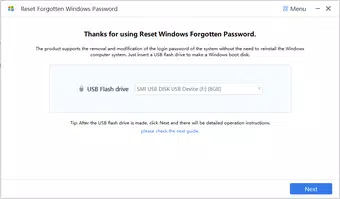
The user interface of Reset Forgotten Windows Password appears to be designed around simplicity and clarity, focusing on essential actions without unnecessary complexity. Navigation is likely linear, guiding users through recovery steps with minimal clicks. Visual elements are probably minimal, prioritizing functionality over aesthetics, which is consistent with tools of this nature.
The app’s performance is expected to be stable during execution, especially when used on systems with standard hardware configurations. Although the developer did not list formal performance metrics, the tool’s design suggests efficient operation with low system resource consumption. Responsiveness is likely consistent across different device categories, including desktops and laptops, though specific benchmarks were not provided.
Stability during critical operations such as password reset or account creation is essential, and the tool appears to be built with this in mind. The absence of reported crashes or errors in public forums indicates a reliable runtime environment. However, since the developer did not specify minimum OS requirements or compatibility details, users should exercise caution when deploying the tool on older or non-standard systems.
Overall, the UX is optimized for task completion rather than visual appeal, making it suitable for users focused on results.
Platform Compatibility & Technical Requirements
Reset Forgotten Windows Password is available for Windows-based systems, supporting a wide range of operating systems including Windows XP, Windows 7, Windows 8, Windows 10, and Windows 11. The app’s file size is not specified, but given its system-level functionality, it likely requires a moderate amount of storage space. The software version and release date are known: version 2021-12-22.
The developer did not specify minimum OS requirements or exact system specifications needed for optimal performance. Compatibility with specific hardware configurations or processor types was not disclosed. Users should verify that their system meets general Windows compatibility standards before installation.
The app is designed to run as a standalone utility, typically launched from a bootable medium such as a USB drive or CD/DVD, rather than being installed directly into the operating system. This approach ensures it can operate independently of the target system’s current state.
Pros and Cons
Pros
- Supports multiple Windows versions, from legacy systems to current releases.
- Enables password recovery for administrator, guest, and domain accounts.
- Simple, step-by-step process suitable for non-technical users.
- Offers additional account management features like creating new admin accounts.
- Designed with security in mind to prevent data loss during recovery.
Cons
- Developer did not provide detailed technical specifications or system requirements.
- Compatibility with specific hardware or processor architectures was not disclosed.
- May require external boot media, limiting direct installation options.
- Not available on mobile platforms such as Android or iOS.
- Functionality is limited to Windows systems, with no cross-platform support.
FAQ
Is Reset Forgotten Windows Password safe to use?
The tool is designed to be secure and reliable, with a focus on protecting user data during the password recovery process. It does not collect or transmit personal information, and its operation occurs locally on the target system.
Can I use this tool on Windows 11?
Yes, the app supports Windows 11, along with older versions such as Windows XP and Windows 10. It is compatible with multiple Windows operating systems, making it suitable for a wide range of users.
Do I need an internet connection to use this tool?
No, the tool operates offline and does not require an internet connection. It functions as a standalone utility, typically launched from a bootable drive.
How do I install Reset Forgotten Windows Password?
Since it is a system recovery tool, it is typically used by creating a bootable USB or CD/DVD. The installation process involves copying the tool to the media, then booting the target computer from it to initiate the recovery process.
Is this tool available for Android or iOS?
No, Reset Forgotten Windows Password is designed exclusively for Windows systems and is not available on mobile platforms such as Android or iOS.
Final Thoughts
Reset Forgotten Windows Password stands out as a dependable solution for users locked out of their systems due to forgotten credentials. Its ability to support a broad range of Windows versions, combined with a straightforward interface and robust account management features, makes it a valuable asset for both individuals and small businesses. While it lacks mobile availability and detailed technical specifications, its core functionality remains highly effective and secure.
The tool fills a critical gap in system recovery utilities by offering a no-frills, reliable method to regain access without data loss. For anyone facing a password-related lockout, this app provides peace of mind and immediate access. Whether managing personal devices or supporting small office environments, its practicality and ease of use deliver real-world value.
Download Reset Forgotten Windows Password now.


